

Whether you’re a student building a personal portfolio, a professional showcasing expertise, or an entrepreneur sharing ideas with the world, one truth remains: your content only matters if people can find it.
In today’s digital landscape, search engines are still one of the most powerful discovery tools (though AI-powered search is growing rapidly and beginning to challenge their dominance — we’ll explore that in a future article). They’re the gateways through which readers, clients, and opportunities reach your work. That means mastering content SEO isn’t just optional — it’s essential for anyone who publishes online.
This article focuses on On-Page SEO, the foundation of search visibility. It’s about how you craft and structure your own content so it’s clear, relevant, and optimized for both humans and algorithms. Later in this series, we’ll also explore Off-Page SEO (building authority) and Technical SEO (ensuring your site is fast, secure, and crawlable).
👉 This is Part 1 of our 3-part SEO series: On-Page SEO, followed by Off-Page SEO and Technical SEO.
The Language of SEO Content:
From Text → MD → HTML
Before we dive into practical tactics, it helps to understand the invisible framework behind nearly every webpage. Content doesn’t go straight from your brain to Google’s index — it passes through a few key stages that give it shape and meaning.
Think of it as a three-step transformation:
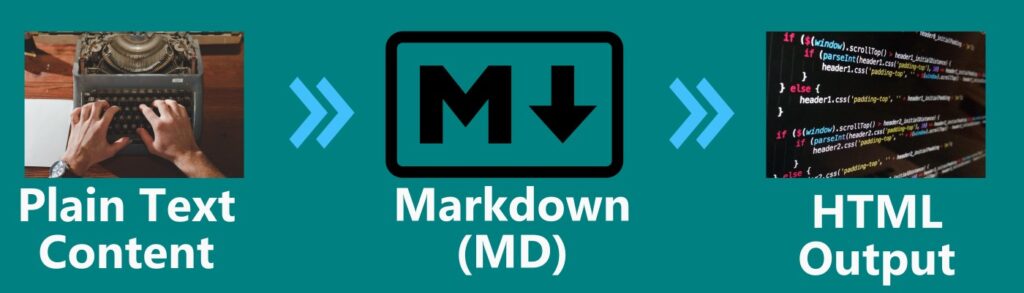
Plain Text Content
This is your raw draft — words, ideas, and notes. It can be typed in MS Word, Notepad, Google Docs, or even scribbled in a notebook. At this stage, it’s only for humans to read; there’s no structure that a search engine can use.
Markdown (MD)
Markdown is technically a lightweight markup language, but here’s the important point: you don’t need to learn or type code to use it.
Most modern editors — like WordPress, Notion, Medium, and many CMS platforms — give you a Word-like interface. You write and format just as you would in Microsoft Word or Google Docs:
- Click “Heading” to create a section title
- Click “Bold” or “Italic” to emphasize text
- Insert images or links using menu options
Behind the scenes, the editor applies Markdown rules automatically. Those rules are then converted into clean HTML.
👉 The result: You get the ease of a Word-like editor, the clarity of Markdown, and the SEO-readiness of HTML — without touching any code.
HTML Output
Once processed, your content becomes HTML — the true language of the web. HTML is what:
- Browsers display to readers as a polished webpage.
- Search engines parse to understand headings, links, and images, so they can index and rank your page correctly.
👉 The takeaway: Start your draft anywhere, format it in an editor with a familiar interface, and you’ll end up with clean HTML that’s both user-friendly and SEO-friendly.
Core Elements of On-Page SEO (Hands-On Guide)
Now that we’ve covered the basics of how content is structured and transformed behind the scenes, it’s time to move into the practical side: optimizing your actual content for search engines and readers.
One thing to keep in mind is that On-Page SEO is where you have the most control. It’s about the words you choose, the way you organize them, and the signals you send through formatting, metadata, and design. In this section, we’ll break down the core elements of On-Page SEO into simple, actionable steps you can apply to every article you publish.
Content Quality & Relevance
Search engines reward content that genuinely helps users. That means clarity, depth, and alignment with what people are actually searching for.
Key practices:
- Start with keyword research (Google Trends, SEMrush, Keyword Surfer).
- Match search intent: informational, navigational, transactional.
- Write comprehensive content that answers questions in one place.
- Use clear, readable language: short paragraphs, lists, and examples.
👉 Action step: Before writing, identify 1 main keyword and 3–5 supporting keywords, then outline how your content will answer the user’s intent.
Headings & Structure
Headings aren’t just visual styling — they’re signals of hierarchy for both readers and search engines.
Key practices:
- Use one H1 (main topic, primary keyword).
- Organize sections with H2 and H3.
- Place important keywords naturally in headings.
- Keep it scannable: readers should get the gist by only reading headings.
👉 Action step: Draft an outline with H1, H2, H3 before writing. This ensures flow and prevents keyword stuffing later.
Meta Tags (Title & Description)
Meta tags don’t appear on your page, but they decide how your page looks in Google results.
Key practices:
- Title tag: 50–60 characters, primary keyword near the start.
- Meta description: 140–160 characters, concise summary + benefit/CTA.
- Make each one unique per page.
Example:
- Bad title: “Home”
- Good title: “Best AI Tools for Entrepreneurs in 2025 | TechnoSavvy”
👉 Action step: Write your meta title & description last, after finishing content, so you pitch it accurately.
Internal Linking
Links guide both users and search engines through your site.
Key practices:
- Link contextually with descriptive anchor text (“AI website builders” not “click here”).
- Always link back to cornerstone or category pages.
- Avoid overloading — 2–4 internal links per 1000 words is a good benchmark.
👉 Action step: After publishing, review your article and add at least 3 internal links: one pointing to a higher-level page, one to a related article, and one to a resource page.
Image Optimization
Images enrich your article, but if unoptimized, they can hurt SEO.
Key practices:
- Use descriptive filenames:
ai-seo-tools.jpginstead ofIMG_1234.jpg. - Add alt text that describes the image (and includes a keyword naturally).
- Compress images to reduce load time (TinyPNG, Squoosh).
- Use WebP format where possible.
👉 Action step: Before uploading, run all images through a compression tool and write meaningful alt text.
UX & Engagement Signals
Search engines measure how users interact with your page: do they stay, scroll, click, or bounce?
Key practices:
- Ensure mobile-friendly layout (responsive design).
- Use clear CTAs: “Read more,” “Try this tool,” “Download now.”
- Avoid intrusive pop-ups or ads blocking content.
- Use white space and readable fonts for smooth scanning.
👉 Action step: Always preview your article on both desktop and mobile before publishing, checking readability and CTA placement.
✅ Quick Recap Checklist
- Primary keyword in H1 and intro
- Logical heading structure (H2/H3)
- Unique meta title (50–60 chars) & description (140–160 chars)
- At least 3 internal links
- Optimized images (filenames, alt text, compressed)
- Mobile-friendly, clear layout with CTAs
Putting It All Together: On-Page SEO Checklist
Use this table as a quick reference every time you publish. It shows the goal, the specific step to take, and the tools that can help (many of which also have affiliate potential).
| Goal | Steps | Tools |
|---|---|---|
| Content Quality & Relevance | Identify 1 main keyword + 3–5 supporting keywords | SEMrush, Ahrefs, Keyword Surfer, Google Trends |
| Match content to search intent (informational, transactional, etc.) | AnswerThePublic, AlsoAsked | |
| Ensure clarity & readability | Grammarly, Hemingway Editor, SurferSEO Content Editor | |
| Headings & Structure | Use one H1 only; organize sections with H2/H3 | WordPress Block Editor, Notion, Obsidian |
| Meta Tags | Write unique title (50–60 chars) & meta description (140–160 chars) | Yoast SEO, Rank Math, SEOPress |
| Internal Linking | Add 2–4 contextual internal links per 1000 words | Link Whisper |
| Image Optimization | Use descriptive filenames, add alt text, compress images | TinyPNG, ShortPixel, Imagify, Smush |
| UX & Engagement | Check mobile layout & page speed | Google Mobile-Friendly Test, PageSpeed Insights |
| Add clear CTAs (buttons, banners, inline prompts) | Thrive Architect, Elementor, Kadence Blocks | |
| Manage popups without hurting UX | OptinMonster, ConvertBox |
Conclusion: From Publishing to Being Discovered
On-Page SEO is the foundation of content visibility. It’s where your words, structure, and presentation come together to signal both to your readers and to search engines what your page is about — and why it deserves attention.
From choosing the right keywords to structuring headings, optimizing images, and crafting meta tags, every step you take helps make your content clearer, more useful, and easier to discover. And as we saw earlier, this process is built on a simple transformation: Plain Text → Markdown → HTML. By understanding that underlying structure, you can see why every optimization — big or small — matters.
Remember: SEO isn’t about tricking algorithms. It’s about creating content that is well-structured, accessible, and valuable. Do that consistently, and both search engines and human readers will reward you.
👉 This concludes Part 1 of our 3-part SEO series. In Part 2, we’ll dive into Off-Page SEO, exploring how backlinks, authority, and reputation expand your reach. Then, in Part 3, we’ll cover Technical SEO, ensuring your site is fast, secure, and built for long-term success.
Expanded Reading
Want to go deeper into On-Page SEO? Here are some trusted resources to explore:
- Google Search Central: SEO Starter Guide — Google’s official documentation on SEO fundamentals.
- Moz: On-Page SEO Factors — A beginner-friendly breakdown of ranking factors.
- Ahrefs: On-Page SEO Guide — A detailed, practical guide with data-backed insights.
- Yoast: SEO Basics — Especially useful for WordPress users.